Where to buy
Need advice? Our highly trained dealers are happy to help with questions, small or large.
Find a dealer near you
Connecting different sized Victron Energy PV modules: Series or Parallel?
Most Victron Energy technical questions are answered by Victron Energy dealers or by contacting Victron Energy customer service on +31(0)36 5359703 or emailing them at service@victronenergy.com. Others get answered here on the blog and on Victron Live, using the Disqus comments section.
Sometimes the sales team receive them directly too. Here is one question received by Bob Hopman about whether you can place different sized Victron Energy PV modules together and whether series or parallel is best. I found this one interesting, hence a short blog.
John Rushworth
Question by an Australian customerSubject: Victron MPPT questionBob,
I hope you don’t mind a silly question. I have a Victron MPPT 75/15. On the roof of my camper van is a 100 Watt solar panel, which is wired into the MPPT.
That’s all great, however sometimes at camp, I’d like to also wire in a completely separate solar panel (a ground standing one) directly into the MPPT but not in parallel – just 2 sets of DC leads from the respective panels to the MPPT.
Is this possible or OK to do?
Its an otherwise simple system
Thanks.
Brad.
Answer by Bob HopmanSubject: Re: Victron MPPT questionDear Brad,
This isn’t a silly question.
There are a couple of things to keep in mind!
Placing different modules in series is possible as long as the open circuit voltage (Voc) does not reach the maximum of the MPPT at cold temperatures.
A few things to note first. Our MPPT Calculator excel sheet does not allow different types of modules in series, so be careful with that. Please also note that damaging the MPPT by applying too high a voltage invalidates the warranty.
There are advantages/ disadvantages for placing them in series or in parallel. Please look at the following image, where I took 2 imaginary PV modules and placed them in series and in parallel:
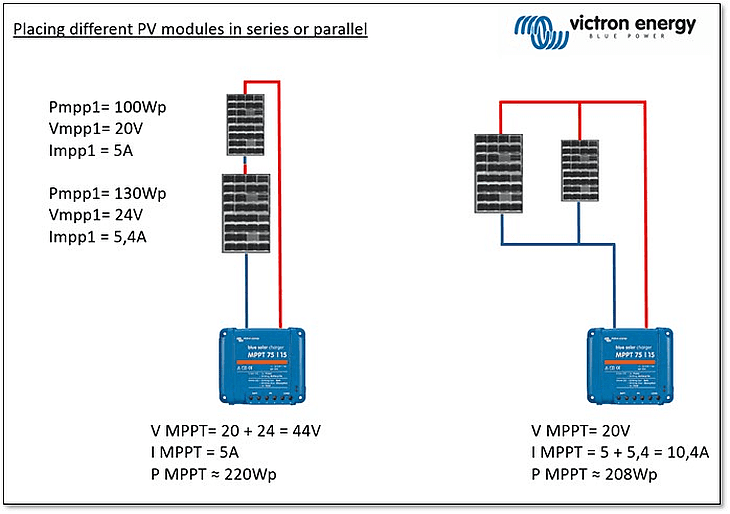
You can see, in this case it would make more sense to place them in series, because the voltages are added and the lowest current of both modules will define the maximum current of the system.
While placing them in parallel you can see a different story, currents are added and the lowest voltage will determine the ‘PV system’ voltage => which in this example results in a lower output power.
If the current would exceed the maximum of 15A, this would not damage the Victron MPPT. To understand this unique feature see my blog: Matching solar modules to MPPT charge controllers
Of course if you combine two different modules in a system, it will be more difficult for the MPPT to find the optimum maximum power point, but it would work!
So it really depends on the modules which you would like to combine in the system – although my best advice is to always keep the system robust and use the same size/wattage of Victron Energy PV modules.
Safety note: I’d never advise to do this in a working ‘live’ system. Always correctly disconnect the battery and panels (and if applicable loads) before changing anything.
I hope this answered your question.
Good luck with your PV system!
Kind regards,
Bob Hopman

Justin Tyers • 30 October 2020
How to Install a MultiPlus Inverter/Charger?
Peter Kennedy is an experienced Victron Dealer/Installer specialising in Marine applications. His company website PKYS carries a useful guide to installing a MultiPlus Inverter. In it Peter adds a whole world of information to the Victron Energy MultiPlus installation manual. He discusses the practicalities of installing a MultiPlus Inverter in compliance with the standards of the American Boat and Yacht Council ( ABYC ); he explains what we’re looking at when we remove the front panel; and he explains the connection-options to other devices. We are grateful to him for allowing us to reproduce his advice here: Introduction This article details the installation of the US Version of the Multiplus 12/3000. This is a 12 Volt DC 120 Volt AC inverter/charger. The official title is MultiPlus 12/3000/120-50 120V VE.Bus and the title indicates that the inverter output is 3000 VA, the charger is rated for 120 Amps and it has a 50 Amp transfer switch. This blog post details unpacking, mounting and wiring your new MultiPlus. Quick Install Sheet If you have built an Ikea bookcase you will instantly recognize the style of the Quick Install Sheet . It is showing you what is in the box, what isn’t in the box, how to mount the unit and how to wire it up. It’s not that easy to follow, so I am going to interpret it in conjunction with the other more detailed manuals, which lack drawings, and I will maybe throw in a photo or two for good measure. What’s included in the box? Multi Plus Wall mounting plate Fasteners Temperature sensor, User manuals What’s not included? Battery Battery cable Battery switch Fuse and fuseholder Remote control panel Cable to connect remote control panel AC input wires AC output wires Grounding cable Voltage sense cable Other optional cables Don’t install an inverter above the batteries This is an ABYC requirement. Lead acid batteries give off corrosive gases that can destroy equipment directly above them, even sealed batteries can vent corrosive gases on occasion. The following diagram is showing you that the MultiPlus needs some space around it for ventilation. The Service Manual gives you more details about the mounting including the following: “The product must be installed in a dry and well-ventilated area, as close as possible to the batteries. There should be a clear space of at least 10cm around the appliance for cooling.”; and also: “The device can be fitted either horizontally or vertically . For optimal cooling, vertical fitting is preferred .” There is more mounting information in the Service manual. Mounting is easy You screw the mounting bracket to the wall. Hang the MultiPlus on the bracket. Pop two screws in the bottom to stop it jumping off. If you are installing it horizontally the same applies. Connecting the small cables This next diagram is a bit confusing because the current model of the MultiPlus doesn’t look like the drawing. At this point it would be helpful to have an actual photograph to see what it really looks like. As we go along I will explain what all the connections are. In the service manual Appendix A gives a drawing to help identify the components and connections. Here’s a photograph of the same view: The connections for the small wires are all in the set of green terminals in the very bottom of the photo. They are all labelled as E in the diagram above. The image below shows what they look like without the wires in the way: The first pair labelled T-Sense are for a temperature sensor. The sensor mounts on the battery negative terminal. The wires are labelled +ive for red and -ive for black. The Aux1 and Aux2 are input terminals and are programmable. We will discuss these when we get to the programming section in a future blog post, typical uses include remote control from the Battery Management System (BMS) of a Lithium Battery where they could be programmed as “allow to charge” and “allow to discharge” The Ground Relay terminal is used if you are installing an Autotransformer, see Autotransformer Instructions for further details The trickle charger terminal can be used for charging an auxiliary battery such as a starting battery. This is just the positive connection. The battery negatives must be common to each other. Max output is 4 Amps K1 and K2 terminals are relay contacts which are programmable and can be used, for example, to automatically start a generator The V Sense wire can be connected to the battery to give a more accurate reading of the battery avoiding voltage drop in the battery main cables. Installing a voltage sense wire is not required but it does give improved performance because the sensor reads the actual battery voltage and can compensate when charging for up to a one volt drop in the cables. There is a +ive and -ive connection that goes to battery positive and negative. (A fuse is required) Main Battery Cables The next panel shows the main battery cable connections. In the diagram above they show a single positive and a single negative cable, but if you look at the picture below you can see there are two studs you can connect to for each with the intention that if necessary you can double-up the cables. The diagram above does not show a battery switch but in the ABYC standards this is a requirement. You need to be able to turn this off if there is a problem or if you want to work on the system. The service manual goes into the cable size in some detail. The service manual suggests using doubled-up 1/0 cables for the main supply and suggests using a 400 Amp fuse for the 12/3000 multiplus. A Class T fuse would be appropriate for this application. The ABYC has quite a bit to say about using doubled-up connectors like this; I have summarized it in the footnotes. According to my reading of the ABYC standard if you were using standard 105°C rated battery cable you would need to use 4/0 AWG cable if you had a 400 amp fuse in the line. The main principal to bear in mind here is that the cables carry a lot of load and the load carrying capacity must match the circuit protection. If doubled-up cables are used the ABYC says each individual cable must be capable of carrying the entire load by itself and they must share a single fuse. The cables need to be as short as possible to reduce voltage drop, the longer they are the greater the cross sectional area needs to be, and the less voltage drop there is the better the performance. Aux Battery Charger This next panel shows the charging circuit for an auxiliary battery such as a starting battery. It has a maximum 4 amp output. The drawing shows that the Aux battery and the Main battery must share a common negative. Then the only wire you need for this is the positive wire. The drawing doesn’t show a fuse for this wire but one is required at the battery end. The wire connects to the terminal labelled “trickle charge” in the middle of the set of green terminal strips. Connecting a remote panel A remote panel is not included with the MultiPlus but is available separately. There are two versions, the Digital Multi Control and the Digital Multi Control GX . These are functionally identical but have a slightly different appearance, the GX version is designed to match the appearance of the Color Control GX . The port is called a VE Bus port and the cable needed for this is the RJ45 UTP cable – also sold separately. It plugs into the position labelled “B” in the big drawing above (titled ‘Appendix A’) and in the photo at the end of this article. There are two adjacent sockets and you can plug it into either, they are identical. There are other things you can plug in there too including a parallel cable to connect multiple units or the new VE.Bus Bluetooth Dongle. Here is a photo showing two devices plugged in. AC Case ground There is a terminal for connecting an AC Case Ground. I wasn’t able to find any written reference to this in either of the other manuals. The ABYC does have some things to say about case grounds for Inverter/Chargers though. AC Output Connections The MultiPlus 12/3000 has dual AC Outputs. AC Output 1 is the main output. It supplies power regardless of whether shore or generator power is available or not and is the output on which the ‘PowerAssist’ feature is available. PowerAssist adds battery power to an AC source (shore or generator for example) when the on-board power demand would otherwise exceed the available current limit. AC Output 2 is only live when the MultiPlus is connected to an external AC source (eg. shore or generator). The thinking here is that by using AC Output 2 for non essential loads like water heaters, you’ll never accidentally drain the batteries if the generator or shore power fails. Each output has terminals for Line, Neutral and Ground. The Ground output is shared between the two outputs. Here is a photo: AC Output 2 is limited to 32 Amps. The Service manual details the recommended wire sizes based on a 50 Amp shore or generator input, see below. The output wires are sized to add the inverter’s PowerAssist amps to the shore or generator power available. For configurations with less than 50 Amp shore-power/generator power or installations where PowerAssist is disabled it should be possible to reduce the necessary wire size by reference to the ABYC tables. AC Input Connections The AC input terminals are on the extreme left and comprise a Line, Neutral and Ground terminal. Recommendations for wire size are shown in the table above and are based on a 50 Amp shore or generator supply. Finishing the Installation Before you put the panel back on you may want to check your work. Have you got the polarity right for the DC terminals? Reverse polarity on these is a fatal error that will destroy the unit. Are the bolts tight? Have you mixed up your incoming and outgoing AC connections? Are those screws tight? Have you connected all the optional extra devices? There are also a few things you might like to look at before you close the lid so I have annotated the photo below with some notes. For most installations you will want to at least do some basic programming of this device. The most basic programming is done using the dipswitches and that requires the cover to be open. Anything more elaborate should be done using one of the computer interfaces available, such as VE Configure . You might also like to make a note of the model and serial number, and the processor number as these are all things you might need later and it’s a lot easier to write them down in the manual than it is to go and open up the unit again. In the photo below I used the same letter key as in the drawing earlier in the article. Below the photo is a list of what all these items are. A AC Input connections B VE.Bus ports for remote panel, parallel configurations etc. (Both ports are identical – you can use either or both.) C AC Output 1 – this is the primary output D AC Output 2 – only works on shore power or generator and is limited to 32 Amps E Optional ports for temp sensor, voltage sensor, programmable options F DC negative connection (dual terminals available if double cables are used) G DC positive connection (dual terminals available) H Connector for remote switch (On, Off, Charger only) I Programmable relay alarm contact. K On-Off Push buttons used in conjunction with dipswitches for basic programming M Dipswitches used for basic programming N Slide switches. Slide switch 1 is used for the ground relay function if the unit is connected to an autotransformer. Switch 2 is not currently used for anything. X Main Processor, make a note of the number in case a firmware update is ever needed (hint: take a photo) The first four digits of the processor number must match the first four digits of the firmware file name. Y Serial number and model number, make a note or take a photo. All the above is taken from Appendix A of the service manual which has additional information on the functions of each item. Other versions of this MultiPlus The 24 volt version of this should be almost identical (24/3000) The “ Compact ” 12/2000 MultiPlus is a bit different, it only has a single AC output and it has a greatly reduced number of terminals for optional connections. Quattros These photos are of a 48 Volt 5000 VA Quattro . You can click on the thumbnail to enlarge the photos. The first one is the AC wiring area and the second is the DC wiring area and all the small connection points. User manuals The following manuals are available for the MultiPlus, I’m not sure which ones are in the box: Quick Install Sheet . User Manual Service Manual . Next steps Programming the MultiPlus is detailed in subsequent articles starting with this one about programming the MultiPlus using the dipswitches . ABYC NOTES From E-11 AC & DC ELECTRICAL SYSTEMS ON BOATS ABYC 11.6.1.2.1 A battery switch shall be installed in the positive conductor(s) from each battery or battery bank with a CCA rating greater than 800 amperes or 100 Ah if CCA is unavailable. 11.10.1.4 Non-motor Loads – The current rating of the overcurrent protection device shall not exceed the maximum current-carrying capacity of the conductor being protected (see TABLES 6A-B). EXCEPTION: If there is not a standard current rating of the overcurrent protection device equal to 100% of the allowable current for the conductor in TABLES 6A-B, the next larger standard current rating may be used, provided it does not exceed 150% of the current allowed by TABLES 6A-B. 11.14.1.2.8 Paralleling of Conductors – conductors of #10 AWG and larger shall be permitted to be connected in parallel where the ampacity of each individual conductor is sufficient to carry the entire load current shared by the parallel conductors. NOTE: Paralleled conductors may be used to achieve the appropriate voltage drop or wire bend radius with smaller individual cables. 11.14.1.2.8.1 Overcurrent protection of paralleled conductors shall be sized to protect a single conductor. 11.14.1.2.8.2 Paralleled conductors shall be of the same length and gauge. 11.14.1.2.8.3 Paralleled conductors shall be run together in the same cable, bundle, or raceway. Here is a link to the Ampacity Tables referred to above, in almost all cases we are using battery cable with 105°C insulation. According to the ABYC if you put a 400 amp fuse in the line then you have to use 4/0 cable. Two times 2/0, which has the same cross sectional area, doesn’t comply because the individual cable is not capable of carrying 400 Amps. I called them up at the ABYC to get some clarification on circuit protection for doubled-up cables. You can use either one fuse or two if you have double cables, but in either case the fuse needs to be sized for what a single cable can carry. From A-31 BATTERY CHARGERS AND INVERTERS MOUNTING 31.5.5.6 To avoid corrosive fumes, battery chargers, inverters and inverter/chargers shall not be installed directly over batteries. 31.6.5 DC GROUNDING CONNECTIONS 31.6.5.1 The DC grounding conductor shall, 31.6.5.1.1 be connected from the metallic case or chassis, to the engine negative terminal or its bus, and 31.6.5.1.2 shall be of an ampacity equal to that of the DC positive conductor. EXCEPTION: The DC grounding conductor may be one size smaller than the minimum size conductor required for the DC current carrying conductors.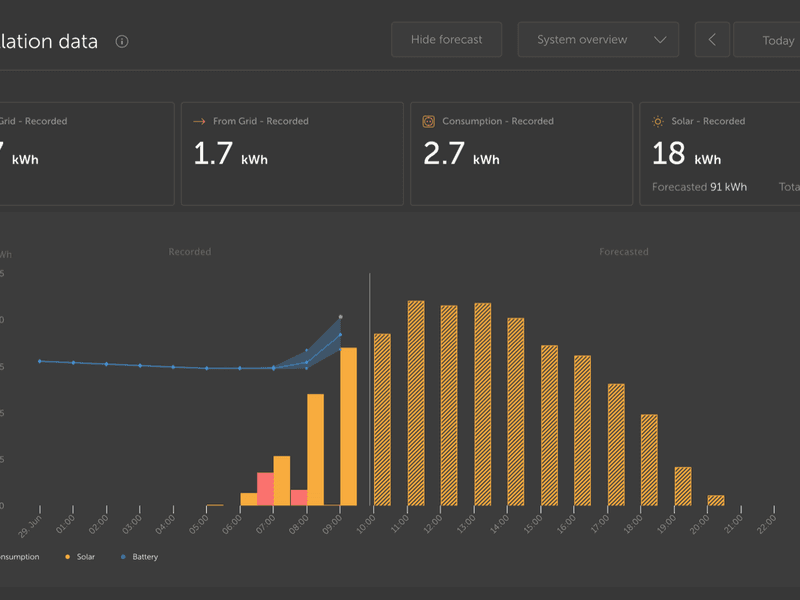
• 05 July 2023
Introducing Solar Production Forecast
We are excited to announce the launch of a new feature for VRM – Solar Forecasts. This feature combines a model of your sites solar production potential with irradiance forecasting data from Solcasts global fleet of weather satellites. https://www.victronenergy.com/blog/wp-content/uploads/sites/10/2023/07/solcast_232349675.mp4 The Solcast network provides 600 million new irradiance forecasts every hour. Getting started Existing installations with a solar history and location set can get started right now. To see the solar forecast, open your site VRM dashboard and select ‘Today’. This should reveal a Show/Hide forecast button. Clicking the Show Forecast button will expand the view to show what remains of the current day, and also draws bars to show the estimated solar production. If the forecast button isn’t there, please check: Your installation has a location set Your site is recording hourly solar yield You are on the ‘today’ view For new sites that don’t yet have a solar yield history, or if you’ve only recently set the site location, please wait up to 48 hours for it be enabled and have enough information to be accurate. This feature uses location data as a 4 km² grid, and doesn’t link any personally identifiable information or co-ordinates of your Victron site. This is accurate enough for the solar data while still maintaining your location privacy. Showing the forecast adds more information to the Solar info box on the dashboard as well. “Solar – Recorded” shows the actual solar energy that has been converted from the sun today. “Forecasted” is the estimate for how much solar production still remains for the day. This number will count down as the day progresses and the actual yield is added to the “recorded” figure. “Total” is a forecasted combined value of the forecast estimate and the actual recorded energy. There might be some rounding of these figures. How is it done? We have created a machine learning model that compares historical solar production and the irradiance at the time of day and then calculates the future projected solar production based on the estimated irradiance forecast. This automatically takes into account factors like system sizing, panel orientation & pitch, efficiency degradation, and shading without requiring any user input. This means that over time the model will get more accurate, even as panels degrade and trees grow. The model goes even further, accounting for when MPPT trackers were at maximum production, or limiting themselves (for example when batteries are full in an off-grid system). In addition to the dashboard estimate, we also have the underlying Solar Irradiance Forecast (W/m²) available as a new advanced VRM widget. Like the dashboard, in the ‘Today’ time frame view, this widget operates slightly differently to the rest and will expand out its time x-axis to include the whole 24 hours so you can see the estimate for that day. A future update for additional advanced VRM widgets will show the estimated production for each individual MPPT tracker. More functionality planned Testing is already well underway for how this new functionality can extended further, such as longer range forecasts and improving the performance of Victron systems in other ways. For example as part of a ‘ Dynamic ESS ‘ system that can take energy pricing information, combined with expectations of solar yield and decide whether to discharge or recharge the battery. It is currently not possible to see the estimates in the VRM phone app widgets. We are working on this for a later release. We’ll make another announcement with more details about these in the future. Going further with Node-RED controls For those who are interested in pushing further with this new solar yield estimate data from VRM for themselves, there is the possibility to integrate with Node-RED. For example the system could be programmed to trigger a relay control for a high load appliance based on the expectation of sufficient solar yield later that day to recharge the battery. Documentation on how to get started using data from VRM in your Node-RED flows is here . Once up and running there is even more detailed specific Node-RED estimated yield flow documentation here. As always with leading edge development like Node-RED the best place to find out more is via the Modifications space on Victron Community . Limitations Sites with these RS products may show less accurate estimates if there are other sources of solar production, or no forecast at all if they are the only source of solar production. We are working now to add full support for them in the near future. Feedback Please report any issues with the user interface, either suggestions for improvement or bugs. We are still improving the estimation algorithm, so are interested in reports of any unusual or impossible estimates. We hope you enjoy this new feature, and are looking forward to hearing your feedback .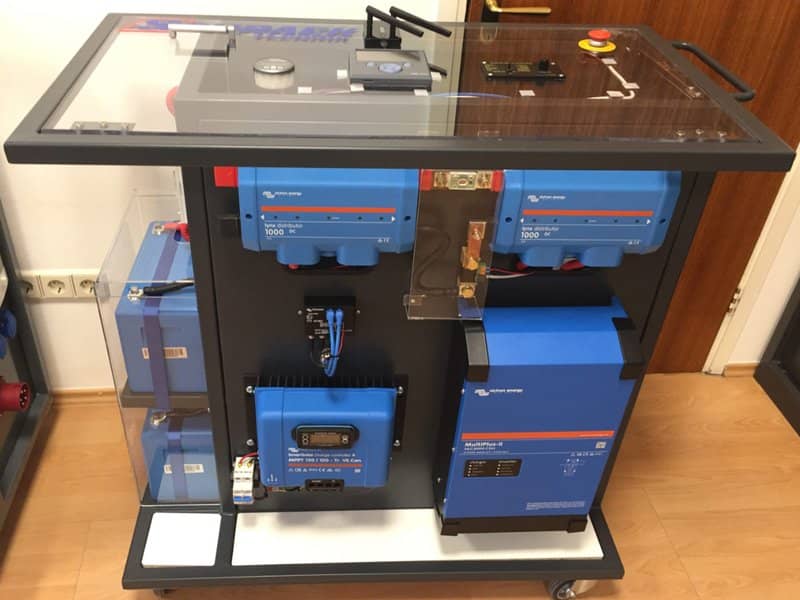
Justin Tyers • 23 March 2021
Teaching Renewables in Croatia
Right across central Europe Schrack Technik provide energy solutions to industry, home and the Electric Vehicle market. They educate customers about the advantages of Solar – and also provide demonstration mobile energy installations for the classroom. In this article Josip Zdenković (PH.D / M.Sc. E.E.) manager of Schrack Technik , Zagreb, Croatia – tells us what his team is doing to help young people in schools in his region. The idea is to use Schrack employee Dario Jankovic’s M.Sc dissertation to serve as an education for those who follow. Josip says: “We are all aware of so called Zero-Energy Buildings through concepts like Passive Houses, Green Building, or Solar Gain. Heat that is not lost does not have to be replaced. This is the key principle of the Passive House Standard and is achieved mostly by means of a well-insulated building envelope, sun shining through the windows, and a ventilation system in which heat from sources such as people and appliances is recovered from the extracted air. The reduced energy demand can be met using renewable energy sources. With regard to the remaining electrical energy requirement, we must control our mains consumption! Photovoltaics and battery storage technology enable that. “Presenting information about electronics and their features is not such a simple task – even to experienced and educated customers! So how do we present it to students aged 15 to 20, pre-university or college? “We are certain that this is the latest age at which we can inspire young people to take an interest in the field of renewables. Shall we use the component-to-system or system-to-component approach (bottom upwards or top-down) to lecturing? We decided with students to adopt a top-down strategy. “Schrack Technik uses a Victron Energy Storage System as the right story for that approach! Here is the Schrack Technik “top-down” story: “It’s clear to every student that the best houses can produce its own needs in addition to producing surplus energy for our electrical cars too! Having a good building envelope; upgrading the windows, installing a heat recovery system, what else can we do? “Today we are using mains electricity as our only energy source. The sun’s energy is at our disposal as a cost-free alternative energy source, but let’s do more. Let’s make it the dominant energy source, keeping mains energy in reserve. How much domestic energy consumption could be provided by the sun is related to power-system dimensioning. Pictured below is the whole system. The house owner should set mains house consumption. Then the actual consumption from the mains is measured. Based on difference between set and actual consumption the consumption controller will pass energy (either direct from sun, or stored from battery) to house loads. So long as there is enough energy from sun, or stored in the battery, house consumption from the mains will be hold on set point. Once there is no sun or there is no more energy stored in battery, the house will be supplied from mains as normal. “Do you think this is enough simple story for students? What are the possible ways of converting solar energy into electricity, and how to control energy flow “In order to achieve the house consumption to stay on set-point, students must understand devices and possible energy flows within those devices. In the picture below both the devices and the possible energy flows are shown. Here we will not go into detail, anyone who is reading this blog is familiar with those devices and their basic operation. Of course for students there should be added some extra words! Educational Energy Storage System based on Victron ESS “For the first set-up Schrack Technik decided to prepare minimal configuration based on Victron ESS which demonstrate the power electronic components, energy flows, and overall strategy to control house consumption from the mains. For the sake of simplicity it was decided not to use a grid inverter for the first model set up, but it can be employed at anytime – the model housing is managed in this way too. Also single phase ESS has been chosen instead of three phase ESS. For educational purposes, single phase ESS is sufficient to show strategy of house mains consumption control! Model set up “Schrack Technik model set up is designed to be mobile. That simply means it is on wheels so that the model can be taken from classroom to classroom. Each classroom should have a 5 pole mains outlet (L1,L2,L3,N,PE – full TN-C-S connection) to connect mobile set up to the mains electricity. “This model emulates a typical house load and typical connections. Loads could be connected to all phases and to MultiPlus II output. This set up can demonstrate off-grid systems too. Photovoltaic modules can be connected to the system, or alternatively a power supply (voltage source with current limitation) can be used. This is important because during the lecture it may be cloudy and the PV modules may not be producing electricity. Devices hang on all three sides of the housing, the fourth side is reserved for grid inverter option. Battery monitor , Color control and Digital Multi Control are installed on a glass top – allowing a view to the back side wiring. Electrical set up schemes “The next two schematics show set-up detail: power components and communication components. Atypically, it is the Battery Monitor and the Color Control connection. Supply of these devices is connected after main battery switch …so when the Lithium batteries are switched off no current is drained from them. This is for safety reasons: because the models are mobile they will not permanently be connected to the mains. When not in use the LFP battery should be switched off from any load. What’s inside?: – Multiplus II 24/3000 – SmartSolar MPPT 150/100 VE.Can – Color Control GX – Energy meter EM 24 – 2 x LiFePO4 Batteries 12,8 V/100 Ah smart – VE.Bus BMS – BMV 712 Smart – 2 Lynx Power in – Digital Multi Control – together with all necessary fuses, switches, protections, cables and covers Donation “Schrack Technik d.o.o. donated a mobile ESS for education to three schools in 2020. There will be three more beneficiaries in 2021. We connect all the teachers involved, so they can exchange experience, working materials and ideas for practical exercises. Schrack Technik trained the teachers – now it is their turn to promote house consumption control to their students. All teachers get administrator access on their installations on the Victron Remote Management (VRM) portal – which allows remote system control and monitoring. Schrack Technik believes that a lot of students will absorb the idea of mains house consumption control. They will learn how simply it can be commissioned and followed on VRM portal and how useful is to control house consumption from mains. Playing with such simple system will enocurage young future installers – freeing of any hesitation about PV installation! High school Konjščina has 270 students and an electrical engineering department. Course tutors Ivana Smetiško, Dalibor Smetiško, Mario Varga, Milan Havoić invest their own time making sure their students have access to the latest developments. Building a Schrack electrical laboratory – they hope to become a centre of competence in renewables education. Electro-mechanical vocational school, Selska , has 600 students. Three enthusiastic teachers: Damir Čolig, Ratko Harausek and Mladen Klobučar lecture in renewables. With a focus on mechanical and electrical engineering they demonstrate the application of the science around real-world examples such as motor vehicles. Technical school, Daruvar, has 474 students whose education is focused on trades and technology. Mario Havranek is the lecturer in renewables, and has a particular interest in Zero-Energy building. He is pleased to be able to offer his students training using the very latest technical equipment. “All students get a copy of the 400 page Schrack Technik brochure showing photovoltaic technology using Victron products, in the main, together with practical examples of Solar installations. Schrack have given away 3000 copies since the programme began 5 years ago.” And for those who speak Croatian and are keen to learn more about the practical application of Victron products – here is a video lecture which has been put together for students of renewables:
Justin Tyers • 15 October 2026
Webinar Invitation: Putting Surplus Solar to Work
Join us on November 6th at 14:00 CET for the second joint webinar hosted by Shelly and Victron Energy to get a deeper understanding of smarter energy management. In the previous Shelly/Victron webinar we learned about energy measurement, surplus solar, and self-consumption. Episode Two builds on that to explore how Victron Energy data can be used to drive coordinated actions across Shelly control, sensing, visualisation, and protection solutions. Webinar hosts Lucian Popescu (Victron Energy) and Orlin Dimitrov (Shelly) will demonstrate how the two ecosystems work together to manage and prioritise GX Opportunity Loads while maintaining manual control and safe fallback behaviour. Discussion Programme The programme includes: Introduction to the Shelly and Victron Energy teams New Victron Venus OS v3.80 and GX capabilities, and support for more Shelly products Bluetooth improvements: using Shelly devices as a bluetooth range extender Opportunity Loads control with Victron Energy, Shelly, and other products Visualization and local control with Shelly Wall Display XL Circuit-level and environmental use cases with Shelly Pro CB and Shelly Weather Station Live demonstration Live Q&A What you will learn During the presentation you will learn: How Victron GX information can trigger Shelly devices; How to use Shelly devices as a bluetooth range extender; How different Shelly products support control, sensing, visualisation, and protection within an energy-management system; How to control and prioritize GX Opportunity Loads while preserving manual control and safe fallback behaviour; How the demonstrated Victron and Shelly system is structured, and How the partnership creates practical value for installers and customers. Who is it for? This information will be invaluable to PV installers using Victron devices, programmers, Electricians, Energy Consultants, Industry Professionals and DIYers interested in load automation. Registration You can register for the event right now. If you are unable to join us on the day, register anyway , and we’ll send you the recording so you can catch up later. Presenters: Lucian Popescu – Victron Energy Guy Stewart – Victron Energy Orlin Dimitrov – Shelly Shenay Okan – Shelly Privacy information This event will be recorded and shared publicly with Shelly/Victron customers, partners, employees and service providers. The recording may include your name and any questions you submit to Q&A session. By registering for the event you agree to the Privacy Policy. We look forward to seeing you!Need advice? Our highly trained dealers are happy to help with questions, small or large.
Find a dealer near you
Check our support resources or contact your original dealer for dedicated support, repairs or warranty requests.
Support
Read more about our industry-leading 5-year standard warranty and global repair service.
Warranty


©Victron Energy 2026